Garage + nginx-proxy - a self-hosted S3 gotcha
Jul. 25, 2026
This blog deploys straight from GitLab CI now: middleman build produces a
static site, then aws s3 sync pushes it to a bucket. Nothing exotic, except
the "S3" on the other end isn't AWS — it's Garage,
a lightweight, self-hosted, S3-compatible object store I run at home. It sits
on a small Tailscale network, with a gateway node exposing the S3 API and S3
website endpoints behind a shared nginxproxy/nginx-proxy reverse proxy that
also fronts a handful of other services.
It's worked well, but getting there involved one debugging session that's worth writing up, because the failure mode was confusing and the fix wasn't where I expected.
Here's roughly how the pieces fit together:
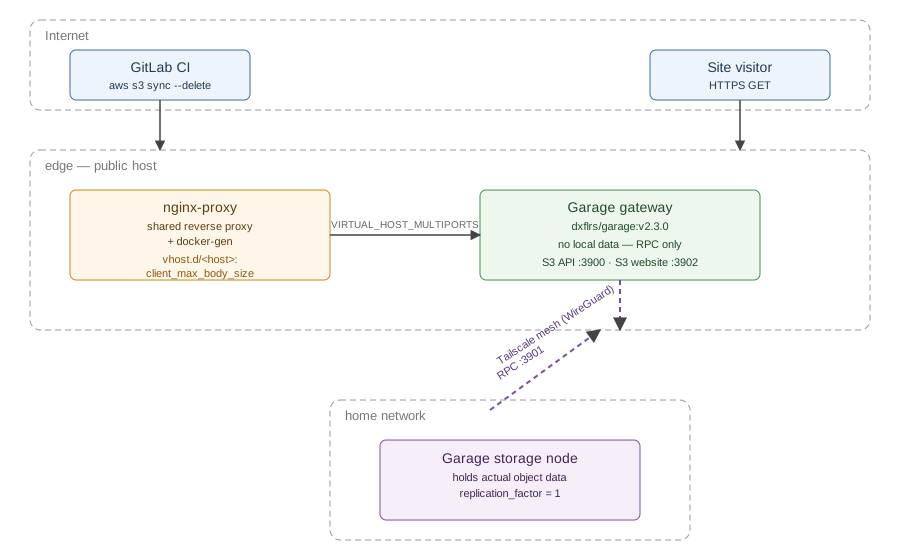
The symptom
Deploys would partially succeed. Most of the site synced fine, but a handful of files consistently failed:
botocore.exceptions.ClientError: An error occurred (413) when calling the
PutObject operation: Request Entity Too Large
413 from S3 itself would usually mean an object over the (very large) S3
size ceiling. That wasn't it — the failing files were a few JPEGs, a couple
of PDFs, and a GIF, all well under a few megabytes. The response body gave it
away once I looked closely:
<html>
<head><title>413 Request Entity Too Large</title></head>
<body>
<center><h1>413 Request Entity Too Large</h1></center>
<hr><center>nginx/1.31.2</center>
</body>
</html>
That's not Garage's error page. That's stock nginx. The request wasn't even reaching the S3 gateway — it was getting rejected one hop earlier, by the reverse proxy sitting in front of it.
Finding the actual threshold
aws s3 sync --debug dumps an enormous amount of botocore/s3transfer tracing,
which is useless to read top to bottom but very useful to grep. Piping it
into a log file and grepping for error|denied|traceback turned a
multi-thousand-line log into a handful of relevant tracebacks, each ending in
the same 413.
Lining up the failing files by size against the succeeding ones showed a
clean cutoff right around 1MB — the smallest failure was a 1.08MB JPEG, and
the largest success was comfortably under 1MB. nginx's default
client_max_body_size is 1m, and that lined up exactly. Even multipart
uploads didn't escape it: individual 8MB UploadPart calls for one larger
GIF failed the same way, because each part is still just a PUT request
against the same limit.
Why the fix wasn't a one-liner
Garage itself has no opinion on body size — this is entirely an nginx
setting, and nginxproxy/nginx-proxy doesn't expose a simple way to set it
globally. Per-vhost nginx config instead comes from files dropped into the
proxy's vhost.d directory, one file per hostname:
echo "client_max_body_size 10m;" | docker exec -i proxy tee /etc/nginx/vhost.d/<hostname>
That's a reasonable mechanism on its own, but there's a second gotcha:
docker-gen, the sidecar that regenerates nginx's config inside that proxy
container, only reacts to Docker events — containers starting or stopping.
Dropping a file into vhost.d doesn't trigger a regen by itself. Nothing
about the proxy's behavior changes until something else causes docker-gen to
fire, which in practice meant forcing it with a restart:
docker restart proxy
Takeaways
- A
413with an nginx-branded error page, not your S3 server's, means the request is dying at a proxy in front of it — check there first. --debugoutput is too noisy to read directly; redirect it to a file and grep for the failure, don't scroll.- If your reverse proxy is
nginx-proxy/docker-genbased, per-vhost settings likeclient_max_body_sizelive invhost.dfiles, and changes there need an explicit nudge (usually a restart) since file changes alone don't trigger a regen. - On a shared proxy, that nudge isn't free. Size the blast radius before reaching for a restart as your go-to fix.
comments powered by Disqus